CS 350: Operating Systems
Lesley Istead
Estimated study time: 1 hr 12 min
Table of contents
Also available: Winter 2020 notes and Winter 2020 help page.
Introduction to Operating Systems
When you double-click a program icon, save a file, push a key on the keyboard, call malloc, or print a document, the operating system is orchestrating every step behind the scenes. CS 350 pulls back the curtain on these mechanisms, revealing how a modern OS manages resources, creates execution environments, loads programs, and provides common services and utilities.
Operating systems trace their origins to 1951, when J. Lyons and Co. built LEO I, arguably the first business computer with a rudimentary OS. Early systems were little more than I/O libraries and batch processors — one of the first commercial operating systems, GM-NAA I/O (1956), ran on room-sized IBM 704 mainframes and did nothing more than run jobs sequentially while providing a library of I/O routines for reading and writing tape drives. From these humble beginnings, operating systems evolved into the sophisticated systems we study today.
Three Views of an Operating System
An OS can be understood from three complementary perspectives — and as the professor puts it, “an operating system is part cop, part facilitator.”
Application View — What services does the OS provide? The OS creates an execution environment for running programs. This environment provides a program with the resources it needs, offers interfaces through which a program can use networks, storage, I/O devices, and other hardware components (these interfaces present a simplified, abstract view of hardware), and isolates running programs from one another to prevent undesirable interactions.
System View — What problems does the OS solve? The OS manages the hardware resources of a computer system: processors, memory, disks, network interfaces, keyboards, monitors, and more. It allocates resources among running programs, controls the sharing of those resources, and must share its own resource consumption with application programs.
Implementation View — How is the OS built? The OS is a concurrent, real-time program. Concurrency arises naturally when the OS supports concurrent applications — multiple programs or instructions appear to run at the same time. The real-time aspect means the OS must respond to events (such as hardware interactions) within specific timing constraints.
Key Definitions
The kernel is the core of the operating system — the part that responds to system calls, interrupts, and exceptions. The operating system as a whole includes the kernel plus related programs that provide services for applications: utility programs, task managers, disk defragmenting tools, command interpreters (like bash or cmd.exe), and programming libraries (like POSIX or OpenGL).
Several kernel architectures exist:
- A monolithic kernel packs “everything and the kitchen sink” into the kernel: device drivers, file systems, virtual memory, IPC, and more. Windows, Linux, macOS, Android, and iOS all use monolithic kernels.
- A microkernel includes only the absolutely necessary components; everything else runs as user-space programs. QNX, a real-time microkernel OS that originated at the University of Waterloo, is a prime example.
- A real-time OS provides stringent event response time guarantees and uses preemptive scheduling.
Operating System Abstractions
The execution environment provided by the OS includes a variety of abstract entities that running programs can manipulate:
| Abstraction | Maps to Hardware |
|---|---|
| Files and file systems | Secondary storage (disks, SSDs) |
| Address spaces | Primary memory (RAM) |
| Processes and threads | Program execution on CPU |
| Sockets and pipes | Network or message channels |
CS 350 covers why and how these abstractions are designed the way they are, how they are manipulated by application programs, and how the OS implements them.
Course Coverage
The course proceeds through the following modules, each building on the previous:
- Threads and Concurrency — the fundamental unit of execution
- Synchronization — protecting shared state
- Processes and the Kernel — isolation and system calls
- Virtual Memory — address translation and protection
- Scheduling — deciding who runs when
- Devices and I/O — communicating with hardware
- File Systems — persistent storage
- Virtual Machines — abstraction all the way down
The course uses OS/161, a teaching operating system of roughly 22,000 lines of kernel code, running on Sys/161, a MIPS R3000 simulator. Students do not write an OS from scratch; instead, they add and fix features of this existing system.
Threads and Concurrency
Key concepts: threads, concurrent execution, timesharing, context switch, interrupts, preemption
What is a Thread?
A thread is a sequence of instructions. A normal sequential program consists of a single thread of execution, but threaded concurrent programs have multiple threads executing — or appearing to execute — simultaneously. Threads may perform the same task or different tasks.
Concurrency — multiple programs or sequences of instructions running, or appearing to run, at the same time — originated in the 1950s to improve CPU utilization during I/O operations. “Modern” timesharing originated in the 1960s.
Why Threads?
Threads offer five key advantages:
- Resource Utilization — When a thread blocks (waiting for I/O, for example), it gives up the CPU to other threads. Without concurrency, the CPU sits idle during these waits. CPU time is money!
- Parallelism — Multiple threads executing simultaneously on multi-core hardware improves performance.
- Responsiveness — Dedicate threads to the UI while others handle loading and long-running tasks.
- Priority — Higher priority threads get more CPU time; lower priority threads get less.
- Modularization — Organize execution tasks and responsibilities into logical units.
Blocking is a critical concept: when a thread blocks, it ceases execution for a period of time (or until some condition is met). The thread is not executing instructions, so the CPU is idle — concurrency lets the CPU execute a different thread during this time.
Threads in OS/161
In the OS, a thread is represented as a structure (or object). OS/161 provides the following thread interface (defined in kern/include/thread.h):
/* Create a new thread */
int thread_fork(
    const char *name,         // name of new thread
    struct proc *proc,        // thread's process
    void (*func)(void *, unsigned long),  // new thread's function
    void *data1,              // function's first param
    unsigned long data2       // function's second param
);

/* Terminate the calling thread */
void thread_exit(void);

/* Voluntarily yield execution */
void thread_yield(void);
Key ideas from this interface:
- A thread can create new threads using
thread_fork. - New threads start execution in a function specified as a parameter.
- The original thread and the new thread proceed concurrently.
- All threads share access to the program’s global variables and heap.
- Each thread’s stack frames are private — each thread has its own stack.
Note that OS/161 does not offer a join function. The join pattern (forcing one thread to block until another finishes) is common in other libraries like pthreads (POSIX threads), OpenMP, and GPGPU programming APIs like CUDA.
Implementing Concurrent Threads
There are three options for running multiple threads:
- Hardware support — With P processors, C cores per processor, and M-way multithreading per core, PCM threads can execute simultaneously. For example, an Intel i9-9900X has 10 cores with 2-way multithreading, giving 20 simultaneous threads.
- Timesharing — Multiple threads take turns on the same hardware, rapidly switching between them so all make progress.
- Hardware + Timesharing — Combine both approaches.
The Fetch/Execute Cycle
Before understanding how threads share a CPU, recall sequential program execution:
1. Fetch the instruction the PC (Program Counter) points to
2. Decode and execute the instruction
3. Increment the PC
Each thread has its own PC, stack pointer, and registers. When two threads share a CPU through timesharing, their contexts must be carefully saved and restored.
MIPS Register Conventions
The MIPS R3000 used in OS/161 has 32 registers with specific conventions:
| Register | Name | Use |
|---|---|---|
| 0 | z0 | Always zero |
| 1 | at | Assembler reserved |
| 2 | v0 | Return value / syscall number |
| 3 | v1 | Return value |
| 4–7 | a0–a3 | Subroutine arguments |
| 8–15 | t0–t7 | Temporaries (caller-save) |
| 16–23 | s0–s7 | Saved (callee-save) |
| 24–25 | t8–t9 | Temporaries (caller-save) |
| 26–27 | k0–k1 | Kernel temporaries |
| 28 | gp | Global pointer |
| 29 | sp | Stack pointer |
| 30 | s8/fp | Frame pointer (callee-save) |
| 31 | ra | Return address (for jal) |
These conventions are enforced by the compiler and used in the OS. Caller-save means it is the calling function’s responsibility to save/restore these registers; callee-save means the called function must preserve them.
Context Switches
When timesharing, the switch from one thread to another is called a context switch. During a context switch:
- Schedule — Decide which thread will run next.
- Save — Save the register contents of the current thread.
- Load — Load the register contents of the next thread.
The thread context must be saved and restored carefully, since thread execution continuously changes the context. Each thread gets a small amount of time to execute (the scheduling quantum); when it expires, a context switch occurs.
Context Switch on the MIPS
The low-level context switch in OS/161 is written in assembly (kern/arch/mips/thread/switch.S):
switchframe_switch:
    /* a0: address of switchframe pointer of old thread */
    /* a1: address of switchframe pointer of new thread */

    /* Allocate stack space for 10 registers (10*4 = 40 bytes) */
    addi sp, sp, -40

    /* Save callee-save registers to old thread's stack */
    sw   ra, 36(sp)
    sw   gp, 32(sp)
    sw   s8, 28(sp)
    sw   s6, 24(sp)
    sw   s5, 20(sp)
    sw   s4, 16(sp)
    sw   s3, 12(sp)
    sw   s2, 8(sp)
    sw   s1, 4(sp)
    sw   s0, 0(sp)

    /* Store old stack pointer in old thread */
    sw   sp, 0(a0)

    /* Load new stack pointer from new thread */
    lw   sp, 0(a1)
    nop                    /* delay slot for load */

    /* Restore callee-save registers from new thread's stack */
    lw   s0, 0(sp)
    lw   s1, 4(sp)
    lw   s2, 8(sp)
    lw   s3, 12(sp)
    lw   s4, 16(sp)
    lw   s5, 20(sp)
    lw   s6, 24(sp)
    lw   s8, 28(sp)
    lw   gp, 32(sp)
    lw   ra, 36(sp)
    nop                    /* delay slot for load */

    /* Return (to the new thread's return address) */
    j    ra
    addi sp, sp, 40        /* in delay slot */
The key insight: switchframe_switch is the callee, so it saves/restores callee-save registers. The caller (thread_switch) handles caller-save registers. The MIPS R3000 pipeline requires delay slots — nop instructions after loads to protect against load-use hazards, and instructions after jumps to protect against control hazards.
What Causes Context Switches?
Four events trigger context switches:
thread_yield— The running thread voluntarily allows other threads to run.thread_exit— The running thread terminates.wchan_sleep— The running thread blocks (waiting for some condition).- Preemption — The running thread involuntarily stops running because its quantum expired.
The OS strives to maintain high CPU utilization. In addition to timesharing, context switches occur whenever a thread ceases to execute instructions.
Thread States
Process state diagram — transitions between new, ready, running, blocked, and terminated.
                   ┌──────────┐
         dispatch  │          │  preempt / yield
        ┌─────────►│ RUNNING  ├──────────┐
        │          │          │          │
        │          └────┬─────┘          │
        │               │               │
        │          block│               │
  ┌─────┴─────┐        │         ┌─────▼─────┐
  │           │        │         │           │
  │   READY   │◄───────┘         │   READY   │
  │           │   unblock        │           │
  └───────────┘◄─────────────────┴───────────┘
        ▲                              │
        │          ┌──────────┐        │
        └──────────┤ BLOCKED  │◄───────┘
           unblock │          │  block
                   └──────────┘
- Running — Currently executing on a CPU.
- Ready — Ready to execute; queued on the ready queue.
- Blocked — Waiting for something; queued on a wait channel.
Timesharing and Preemption
Timesharing achieves concurrency by rapidly switching between threads. The scheduling quantum imposes an upper bound on how long a thread can run before it must yield the CPU.
But how do you stop a running thread that never yields, blocks, or exits? Preemption forces a running thread to stop, accomplished through interrupts.
Interrupts
An interrupt is an event caused by a system device (hardware) — a timer, disk controller, or network interface. When an interrupt occurs:
- The hardware automatically transfers control to a fixed memory location containing an interrupt handler.
- The interrupt handler creates a trap frame to record the thread’s context at the time of the interrupt.
- It determines which device caused the interrupt and performs device-specific processing.
- It restores the saved thread context from the trap frame and resumes execution.
Preemptive Scheduling
A preemptive scheduler uses the scheduling quantum to impose a time limit. Periodic timer interrupts track running time. If a thread has run too long, the timer interrupt handler calls thread_yield, preempting the thread. The preempted thread changes from running to ready and is placed on the ready queue.
Each time a thread goes from ready to running, its runtime counter resets to zero — runtime does not accumulate across quanta. OS/161 uses preemptive round-robin scheduling.
Two-Thread Context Switch Example
Consider Thread 1 (running) and Thread 2 (ready, having previously called thread_yield):
- Thread 1 is RUNNING; Thread 2 is READY.
- A timer interrupt occurs. A trap frame is created to save Thread 1’s context.
- The timer interrupt handler determines Thread 1 has exceeded its quantum.
thread_yieldis called →thread_switch→switchframe_switch.- Thread 1’s callee-save registers are saved; Thread 2’s are restored.
- Thread 2 is now RUNNING; Thread 1 is now READY.
- Thread 2 returns from
switchframe_switch→thread_switch→thread_yield, restoring its context. - Later, Thread 2 yields. The reverse process occurs, and Thread 1 resumes.
- Thread 1 returns from the interrupt handling chain, and its trap frame is restored.
The stack builds up layers: regular program → trap frame → interrupt handler → thread_yield → thread_switch → switchframe_switch. Each layer is unwound in reverse order when the thread resumes.
Synchronization
Key concepts: critical sections, mutual exclusion, test-and-set, spinlocks, blocking locks, semaphores, condition variables, deadlocks
The Problem: Race Conditions
All threads in a concurrent program share access to global variables and the heap. A critical section is any part of a concurrent program where a shared object is accessed. When multiple threads read and write the same memory simultaneously, the program’s result may depend on the order of execution — this is a race condition.
Consider this example:
int volatile total = 0;

void add() {
    for (int i = 0; i < N; i++) {
        total++;
    }
}

void sub() {
    for (int i = 0; i < N; i++) {
        total--;
    }
}
If one thread runs add and another runs sub, the final value of total should be 0. But total++ is not atomic — it compiles to three instructions:
lw   R9, 0(R8)     /* load total into register */
add  R9, 1          /* increment */
sw   R9, 0(R8)     /* store back */
If a context switch occurs between the load and the store, both threads may read the same value, and one update is lost. Depending on interleaving, the final value could be 0, 1, or -1.
Identifying Race Conditions
To find race conditions: locate the critical sections, inspect each variable, and determine whether multiple threads could read/write it simultaneously. Constants and memory that all threads only read do not cause race conditions.
Locks (Mutexes)
Locks enforce mutual exclusion — at most one thread can hold the lock at any time. Any thread that cannot acquire the lock immediately must wait until it becomes available.
int volatile total = 0;
bool volatile total_lock = false;   // false = unlocked

void add() {
    for (int i = 0; i < N; i++) {
        Acquire(&total_lock);
        total++;
        Release(&total_lock);
    }
}
A Naive (Broken) Lock
Acquire(bool *lock) {
    while (*lock == true) ;   /* spin until free */
    *lock = true;              /* grab the lock */
}

Release(bool *lock) {
    *lock = false;
}
This does not work! The test (*lock == true) and set (*lock = true) are separate instructions — a context switch between them allows two threads to both believe they acquired the lock.
Hardware Atomic Instructions
The solution requires hardware support for atomic test-and-set:
x86 xchg — Atomically swaps a register value with a memory location:
Xchg(value, addr) {
    old = *addr;
    *addr = value;
    return old;
}

Acquire(bool *lock) {
    while (Xchg(true, lock) == true) ;
}
If Xchg returns true, the lock was already held. If it returns false, the lock was free and we now own it. This is a spinlock — the thread busy-waits (spins) until the lock is free.
ARM LDREX/STREX — Load-exclusive and store-exclusive act as a barrier:
ARMTestAndSet(addr, value) {
    tmp = LDREX addr;
    result = STREX value, addr;
    if (result == SUCCEED) return tmp;
    return TRUE;    /* STREX failed, keep trying */
}
STREX fails if the memory at addr was touched between LDREX and STREX, ensuring atomicity.
MIPS ll/sc — Load-linked and store-conditional:
MIPSTestAndSet(addr, value) {
    tmp = ll addr;
    result = sc addr, value;
    if (result == SUCCEED) return tmp;
    return TRUE;
}
sc succeeds only if the value at the address has not changed since ll. The truth table:
| Initial Lock | Lock at ll | Lock at sc | Lock after sc | sc Returns | Result |
|---|---|---|---|---|---|
| FALSE | FALSE | FALSE | TRUE | SUCCEED | Own lock |
| FALSE | FALSE | TRUE | TRUE | FAIL | Keep spinning |
| TRUE | TRUE | TRUE | TRUE | SUCCEED | Keep spinning |
| TRUE | TRUE | FALSE | FALSE | FAIL | Keep spinning |
OS/161 Spinlock Implementation
OS/161’s spinlock uses inline MIPS assembly (kern/arch/mips/thread/spinlock.c):
spinlock_data_testandset(volatile spinlock_data_t *sd) {
    spinlock_data_t x, y;
    y = 1;
    __asm volatile(
        ".set push;"         /* save assembler mode */
        ".set mips32;"       /* allow MIPS32 instructions */
        ".set volatile;"     /* avoid unwanted optimization */
        "ll %0, 0(%2);"     /* x = *sd */
        "sc %1, 0(%2);"     /* *sd = y; y = success? */
        ".set pop"           /* restore assembler mode */
        : "=r" (x), "+r" (y) : "r" (sd)
    );
    if (y == 0) { return 1; }   /* sc failed */
    return x;                     /* return old value */
}
A return value of 0 means the lock was acquired. The function is called in a loop by spinlock_acquire.
Spinlocks vs. Blocking Locks
OS/161 has both spinlocks and blocking locks:
| Property | Spinlock | Lock (Mutex) |
|---|---|---|
| Waiting behavior | Spins (busy-waits) | Blocks (sleeps) |
| Owned by | A CPU | A thread |
| Interrupts | Disabled on owning CPU | Not disabled |
| Use case | Short critical sections | Longer critical sections |
Important: Spinlocks disable interrupts on their CPU, which disables preemption. This minimizes spinning but means you must never use spinlocks to protect large critical sections — other threads on that CPU cannot run.
/* Lock API */
struct lock *lock_create(const char *name);
void lock_acquire(struct lock *lk);
void lock_release(struct lock *lk);
bool lock_do_i_hold(struct lock *lk);
void lock_destroy(struct lock *lk);
Thread Blocking and Wait Channels
Sometimes a thread needs to wait — for a lock, for data from a slow device, for keyboard input. When a thread blocks, it stops running: the scheduler picks a new thread, performs a context switch, and queues the blocked thread on a wait channel (not the ready queue).
void wchan_sleep(struct wchan *wc);      /* block on wait channel */
void wchan_wakeall(struct wchan *wc);    /* unblock all on wait channel */
void wchan_wakeone(struct wchan *wc);    /* unblock one */
void wchan_lock(struct wchan *wc);       /* prevent operations on wc */
There can be many different wait channels, each holding threads blocked for different reasons. Wait channels in OS/161 are implemented with queues.
Semaphores
Mutex / semaphore — two threads competing for the same critical section.
A semaphore is a synchronization primitive with an integer value and two atomic operations:
- P (wait/down): If the value is greater than 0, decrement it. Otherwise, wait until it is greater than 0, then decrement.
- V (signal/up): Increment the value.
Types of Semaphores
- Binary semaphore — Initial value 1; behaves like a lock but without ownership tracking.
- Counting semaphore — Arbitrary number of resources.
- Barrier semaphore — Initial value 0; forces a thread to wait until resources are produced.
Key differences from locks: V does not have to follow P; a semaphore can start with 0 resources; semaphores have no owners.
Producer/Consumer with Bounded Buffer
struct semaphore *Items  = sem_create("Buffer Items", 0);
struct semaphore *Spaces = sem_create("Buffer Spaces", N);

/* Producer */
P(Spaces);
add_item_to_buffer();
V(Items);

/* Consumer */
P(Items);
remove_item_from_buffer();
V(Spaces);
This ensures consumers wait when the buffer is empty and producers wait when it is full. However, there is still a race condition on the buffer itself — a third synchronization primitive (a lock or binary semaphore) is needed to protect the buffer data structure.
Semaphore Implementation
P(struct semaphore *sem) {
    spinlock_acquire(&sem->sem_lock);
    while (sem->sem_count == 0) {
        wchan_lock(sem->sem_wchan);
        spinlock_release(&sem->sem_lock);
        wchan_sleep(sem->sem_wchan);
        spinlock_acquire(&sem->sem_lock);
    }
    sem->sem_count--;
    spinlock_release(&sem->sem_lock);
}

V(struct semaphore *sem) {
    spinlock_acquire(&sem->sem_lock);
    sem->sem_count++;
    wchan_wakeone(sem->sem_wchan);
    spinlock_release(&sem->sem_lock);
}
Critical subtlety: The wait channel must be locked before releasing the spinlock. If the spinlock were released first, a context switch could occur, and another thread could call V (incrementing the count and calling wchan_wakeone) before the first thread sleeps — causing the first thread to sleep on a semaphore that has resources, potentially forever.
Condition Variables
Condition variables allow threads to wait for arbitrary conditions inside a critical section. Each condition variable works together with a lock. Three operations:
cv_wait(cv, lock)— Releases the lock, blocks the calling thread on the CV’s wait channel, and reacquires the lock when unblocked.cv_signal(cv, lock)— Unblocks one thread waiting on the CV.cv_broadcast(cv, lock)— Unblocks all threads waiting on the CV.
Signaling a CV with no waiters has no effect — signals do not accumulate (unlike semaphores).
Bounded Buffer with Condition Variables
int volatile count = 0;
struct lock *mutex;
struct cv *notfull, *notempty;

void Produce(itemType item) {
    lock_acquire(mutex);
    while (count == N) {
        cv_wait(notfull, mutex);     /* wait until not full */
    }
    add_item_to_buffer(item);
    count++;
    cv_signal(notempty, mutex);      /* signal: buffer not empty */
    lock_release(mutex);
}

itemType Consume() {
    lock_acquire(mutex);
    while (count == 0) {
        cv_wait(notempty, mutex);    /* wait until not empty */
    }
    remove_item_from_buffer();
    count--;
    cv_signal(notfull, mutex);       /* signal: buffer not full */
    lock_release(mutex);
    return item;
}
Both Produce and Consume use while loops around cv_wait — not if. This is because OS/161 uses Mesa-style condition variables: when a thread is woken by cv_signal, it reacquires the lock, but another thread may have already changed the condition. The thread must re-check.
Volatile and Other Sources of Race Conditions
Race conditions can occur for reasons beyond the programmer’s control:
Compiler optimizations — The compiler may keep a shared variable in a register rather than memory, so one thread’s writes are invisible to another. The volatile keyword forces the compiler to load/store the variable from/to memory on every access and prevents reordering of loads and stores for that variable.
CPU optimizations — Modern CPUs reorder loads and stores for performance. Barrier or fence instructions disable and re-enable these optimizations. (The MIPS R3000 does not require them.)
Many modern languages support memory models and language-level synchronization that make the compiler aware of critical sections. The version of C used by OS/161 does not support this.
Deadlocks
A deadlock occurs when two or more threads are permanently stuck, each waiting for a resource held by another:
lock lockA, lockB;

int FuncA() {             int FuncB() {
    lock_acquire(lockA);      lock_acquire(lockB);
    lock_acquire(lockB);      lock_acquire(lockA);
    ...                       ...
    lock_release(lockA);      lock_release(lockB);
    lock_release(lockB);      lock_release(lockA);
}                         }
If Thread 1 acquires lockA and Thread 2 acquires lockB, then Thread 1 tries to acquire lockB (held by Thread 2) and Thread 2 tries to acquire lockA (held by Thread 1). Neither can make progress. Waiting will not resolve the deadlock.
Deadlock Prevention
Two techniques:
- No Hold and Wait — A thread must request all resources at once in a single request. It cannot request additional resources while holding any.
- Resource Ordering — Number the resource types and require threads to acquire resources in increasing order. A thread holding resource type i may not request any resource of type ≤ i.
Processes and the Kernel
Key concepts: process, system call, processor exception, fork/execv, multiprocessing
What is a Process?
A process is an environment in which an application program runs. It includes:
- One or more threads (OS/161 supports only one thread per process)
- Virtual memory for the program’s code and data
- Other resources (e.g., file and socket descriptors)
Processes are created and managed by the kernel. Each program’s process isolates it from other programs in other processes. This isolation is fundamental to operating system security.
Process Management Calls
| Operation | Linux | OS/161 |
|---|---|---|
| Creation | fork, execv | fork, execv |
| Destruction | exit, kill | exit |
| Synchronization | wait, waitpid, pause, … | waitpid |
| Attribute Mgmt | getpid, getuid, nice, … | getpid |
In OS/161, these system calls are not implemented by default — students implement them as assignments.
fork, exit, and waitpid
fork creates a new process (the child) that is a clone of the original (the parent). After fork, both parent and child execute copies of the same program. Their virtual memories are identical at the time of the fork but may diverge afterwards. fork is called by the parent but returns in both processes — the parent receives the child’s PID, while the child receives 0.
exit terminates the calling process with a status code. The kernel records this code for retrieval by waitpid.
waitpid lets a process wait for another to terminate and retrieve its exit status.
int main() {
    rc = fork();
    if (rc == 0) {
        /* Child executes here */
        my_pid = getpid();
        x = child_code();
        _exit(x);
    } else {
        /* Parent executes here */
        child_pid = rc;
        parent_pid = getpid();
        parent_code();
        p = waitpid(child_pid, &child_exit, 0);
        if (WIFEXITED(child_exit))
            printf("child exit status was %d\n",
                   WEXITSTATUS(child_exit));
    }
}
execv
execv replaces the current process’s program with a new one:
- The current virtual memory is destroyed
- A new virtual memory is initialized with the new program’s code and data
- The process ID stays the same
int main() {
    char *args[4];
    args[0] = (char *) "/testbin/argtest";
    args[1] = (char *) "first";
    args[2] = (char *) "second";
    args[3] = 0;                          /* NULL terminator */
    rc = execv("/testbin/argtest", args);
    printf("If you see this execv failed\n");
}
The fork+execv pattern is the standard way to create a new process running a different program.
System Calls
System calls are the interface between processes and the kernel. They include:
| Service | OS/161 Examples |
|---|---|
| Process management | fork, execv, waitpid, getpid |
| File operations | open, close, remove, read, write |
| Directories | mkdir, rmdir, link, sync |
| IPC | pipe, read, write |
| Virtual memory | sbrk |
| System management | reboot, time |
Kernel Privilege
The CPU implements different privilege levels (or rings). Kernel code runs at the highest privilege; application code at a lower level. This prevents user programs from modifying page tables, halting the CPU, or accessing kernel data structures. Applications cannot directly call kernel functions.
(The Meltdown vulnerability found on Intel chips lets user applications bypass execution privilege and access any address in physical memory.)
How System Calls Work
Since applications cannot directly call kernel code, they trigger an exception to transfer control to the kernel. On MIPS:
- The application places the system call code in register
v0and parameters ina0–a3. - The application executes the
syscallinstruction, which raises exceptionEX_SYS. - The CPU switches to privileged mode and transfers control to the kernel’s exception handler.
- The exception handler (
common_exception) saves the application state in a trap frame on the kernel stack. mips_trapdetermines this is a system call and callssyscall().syscall()dispatches to the appropriate handler (e.g.,sys_fork) based on the code inv0.- After the system call completes, the trap frame is restored, the CPU returns to unprivileged mode, and the application continues.
System call codes are defined in kern/include/kern/syscall.h:
#define SYS_fork     0
#define SYS_vfork    1
#define SYS_execv    2
#define SYS__exit    3
#define SYS_waitpid  4
#define SYS_getpid   5
User and Kernel Stacks
Every OS/161 process thread has two stacks:
- User (Application) Stack — Located in the application’s virtual memory, holds activation records for application functions.
- Kernel Stack — A kernel data structure (pointed to by
t_stackin the thread structure), holds activation records for kernel functions, trap frames, and switch frames.
Only one stack is used at a time. System calls are expensive because of this full context-switch dance between user and kernel mode.
Multiprocessing
Multiprocessing (or multitasking) means having multiple processes at the same time, all sharing hardware resources:
- Each process’s virtual memory is implemented using a portion of physical memory
- Each process’s threads are scheduled onto available CPUs by the OS
- Processes share access to disks, network devices, and I/O through system calls
The OS ensures that processes are isolated. Inter-process communication (IPC) is possible only at the explicit request of the processes involved:
| IPC Method | Description |
|---|---|
| File | Shared data written to a file |
| Socket | Data sent via network interface |
| Pipe | Unidirectional OS-managed data buffer |
| Shared Memory | Shared memory block visible to both processes |
| Message Queue | OS-provided queue/data stream |
Virtual Memory
Key concepts: virtual memory, physical memory, address translation, MMU, TLB, relocation, paging, segmentation, executable file, swapping, page fault, locality, page replacement
Process memory layout — virtual address space from low to high addresses.
Physical and Virtual Memory
Physical memory is addressed by physical addresses. If physical addresses are P bits, the maximum addressable memory is 2P bytes. The Sys/161 MIPS CPU uses 32-bit physical addresses (P = 32), giving a maximum of 4 GB.
The kernel provides a separate, private virtual memory for each process, holding the code, data, and stack for the running program. If virtual addresses are V bits, the maximum virtual memory size is 2V bytes (V = 32 for MIPS).
Running applications see only virtual addresses — the PC, stack pointer, and all pointers hold virtual addresses. Each process is isolated in its virtual memory and cannot access other processes’ memories.
Virtual memory serves two key purposes:
- Isolation — Processes cannot interfere with each other or the kernel.
- Overcommitment — The total size of all virtual memories can exceed physical memory, supporting greater multiprocessing.
Virtual memory dates back to a 1956 doctoral thesis. Burroughs (1961) and Atlas (1962) produced the first commercial machines with virtual memory.
Address Translation
When a process accesses a virtual address, the Memory Management Unit (MMU) translates it to a physical address using information provided by the kernel. Even the PC is virtual — every instruction requires at least one translation, which is why this must happen in hardware.
Dynamic Relocation
The simplest scheme: the MMU has a relocation register (R) and a limit register (L). For virtual address v:
if v < L then
    physical address p = v + R
else
    raise exception
This is efficient but suffers from external fragmentation — physical memory becomes divided into unusable gaps. It also wastes physical memory because the entire contiguous virtual address range must be mapped, even if only small portions are used.
Segmentation
Instead of mapping the entire virtual memory, map each segment (code, data, stack) separately. A virtual address becomes (segment ID, offset within segment). With K bits for the segment ID, there can be up to 2K segments with 2V−K bytes per segment.
Translation: split the virtual address into segment number (s) and address within segment (a):
if a >= Limit[s] then
    raise exception
else
    physical address = a + Relocation[s]
Segmentation reduces wasted memory but still suffers from external fragmentation.
Paging
Paging divides physical memory into fixed-size chunks called frames and virtual memory into equal-sized pages. Page size equals frame size (typically 4 KB). Each page can map to any frame, and the mapping is stored in a page table.
For example, with 18-bit physical addresses and 4 KB pages:
- 218 / 212 = 64 frames of physical memory
- With 16-bit virtual addresses: 216 / 212 = 16 pages in virtual memory
Page Table Entries (PTEs)
Each row in the page table maps a page number to a frame number. Key fields:
| Field | Purpose |
|---|---|
| Frame number | Physical frame the page maps to |
| Valid bit | Whether this PTE is used (1) or not (0) |
| Write protection | Whether the page is read-only |
| Reference (use) bit | Has the process used this page recently? |
| Dirty bit | Have the contents been modified? |
Number of PTEs = Maximum Virtual Memory Size / Page Size.
Page table address translation — virtual page number → frame number → physical address.
Address Translation with Paging
The MMU’s page table base register points to the current process’s page table. To translate virtual address v:
- Compute page number = v / page_size (high-order bits)
- Compute offset = v mod page_size (low-order bits)
- Look up the PTE using the page number
- If the PTE is not valid, raise an exception
- Physical address = (frame_number × frame_size) + offset
  Virtual Address (16 bits)
  ┌────────┬──────────────┐
  │ Page # │   Offset     │
  │ 4 bits │  12 bits     │
  └───┬────┴──────┬───────┘
      │           │
  Page Table      │
  Lookup          │
      │           │
      ▼           │
  ┌────────┐      │
  │Frame # │      │
  │ 6 bits │      │
  └───┬────┘      │
      │           │
  ┌───┴────┬──────┴───────┐
  │Frame # │   Offset     │
  │ 6 bits │  12 bits     │
  └────────┴──────────────┘
  Physical Address (18 bits)
Page Table Size Problem
With V = 32 bits and 4 KB pages, the page table has 232/212 = 220 entries. With 4-byte PTEs, that is 4 MB per process. With V = 48 bits, the table would be 256 GB!
Multi-Level Paging
To shrink the page table, organize it hierarchically. A page table directory at level 1 contains pointers to level-2 tables, which contain pointers to level-3 tables, and so on. The lowest-level table contains the actual frame numbers.
The key optimization: if a table contains no valid PTEs, it is not created at all. For a process using only a small portion of its address space, most second-level tables are never allocated.
For a two-level scheme with 16-bit virtual addresses and 4 KB pages:
  Virtual Address (16 bits)
  ┌──────┬──────┬──────────────┐
  │ L1   │ L2   │   Offset     │
  │2 bits│2 bits│  12 bits     │
  └──┬───┴──┬───┴──────┬───────┘
     │      │          │
  Directory │          │
  Lookup    │          │
     │      │          │
     ▼      │          │
  ┌──────┐  │          │
  │Addr  │  │          │
  │of L2 │  │          │
  └──┬───┘  │          │
     │      │          │
     ▼      ▼          │
  Page Table            │
  Lookup               │
     │                 │
     ▼                 │
  ┌──────┐             │
  │Frame#│             │
  └──┬───┘             │
     │                 │
     ▼                 ▼
  Physical Address (18 bits)
As virtual address sizes grow, more levels are needed. Current Intel CPUs support 4-level paging with 48-bit virtual addresses; support for 5-level paging with 57-bit addresses is being implemented.
Translation Lookaside Buffers (TLBs)
Address translation through a page table adds at least one extra memory access per instruction. The TLB is a small, fast cache of recent (page → frame) translations in the MMU.
To translate virtual address on page p:
    if (p, f) exists in TLB then
        return f                     /* TLB hit */
    else
        find f from the page table
        add (p, f) to TLB (evict an entry if full)
        return f                     /* TLB miss */
If the MMU cannot distinguish entries from different address spaces, the kernel must flush the TLB on every context switch between processes.
Software-Managed TLBs (MIPS)
The MIPS has a software-managed TLB — on a TLB miss, the hardware raises an exception rather than walking the page table itself. The kernel must:
- Determine the frame number for the page
- Load the (page, frame) entry into the TLB
After handling the miss, the faulting instruction is retried. This means the kernel is free to store page-to-frame mappings in any format it chooses.
The MIPS R3000 TLB has 64 entries, each 64 bits (see kern/arch/mips/include/tlb.h):
High word (32 bits): [20-bit page #][6-bit PID (unused)][...]
Low word (32 bits):  [20-bit frame #][valid][write permission (TLBLO_DIRTY)]
Virtual Memory in OS/161: dumbvm
OS/161’s simple VM implementation (dumbvm) does not use page tables. Instead, it uses an addrspace structure that describes three contiguous segments:
struct addrspace {
    vaddr_t as_vbase1;      /* base virtual address of code segment */
    paddr_t as_pbase1;      /* base physical address of code segment */
    size_t  as_npages1;     /* size (in pages) of code segment */
    vaddr_t as_vbase2;      /* base virtual address of data segment */
    paddr_t as_pbase2;      /* base physical address of data segment */
    size_t  as_npages2;     /* size (in pages) of data segment */
    paddr_t as_stackpbase;  /* base physical address of stack */
};
On a TLB miss, vm_fault uses the addrspace to compute:
if (faultaddress >= vbase1 && faultaddress < vtop1)
    paddr = (faultaddress - vbase1) + as->as_pbase1;
else if (faultaddress >= vbase2 && faultaddress < vtop2)
    paddr = (faultaddress - vbase2) + as->as_pbase2;
else if (faultaddress >= stackbase && faultaddress < stacktop)
    paddr = (faultaddress - stackbase) + as->as_stackpbase;
else
    return EFAULT;
The stack is 12 pages, ending at virtual address 0x7FFF_FFFF (USERSTACK = 0x8000_0000).
ELF Files
Programs are loaded from ELF (Executable and Linking Format) files. An ELF file contains segment descriptions (virtual start address, length, data) and identifies the entry point (the first instruction’s virtual address). OS/161’s dumbvm assumes two segments: text (code + read-only data) and data (other global data). The ELF does not describe the stack — dumbvm creates it.
OS/161 Memory Layout
Virtual Memory (32-bit)
┌──────────────────┬─────────────────────────────────────────┐
│   kuseg (user)   │          kernel addresses                │
│   0x0 - 0x7FFF   │                                         │
│   FFFF           │  kseg0    │  kseg1    │  kseg2          │
│   paged via TLB  │ 0x8000-  │ 0xA000-   │ 0xC000-         │
│                  │ 0x9FFF   │ 0xBFFF    │ 0xFFFF          │
│                  │ FFFF     │ FFFF      │ FFFF            │
└──────────────────┴──────────┴───────────┴─────────────────┘

Physical Memory
┌─────────────────────────────┬─────────────────────────────┐
│         RAM (up to 1GB)     │  unused (3 GB unavailable)  │
│         0x0 - 0x3FFF FFFF   │                             │
└─────────────────────────────┴─────────────────────────────┘
- kuseg (0x0 – 0x7FFF FFFF): User address space, paged via TLB.
- kseg0 (0x8000 0000 – 0x9FFF FFFF): Kernel data structures, stacks, code. Translated by subtracting 0x8000 0000. TLB is not used.
- kseg1 (0xA000 0000 – 0xBFFF FFFF): Device addresses. Translated by subtracting 0xA000 0000. TLB is not used.
- kseg2 (0xC000 0000 – 0xFFFF FFFF): Not used in OS/161.
Swapping and Page Faults
When physical memory is insufficient, pages can be swapped to secondary storage (disk/SSD). The present bit in each PTE tracks which pages are in memory:
| Valid | Present | Meaning |
|---|---|---|
| 1 | 1 | Page is valid and in memory |
| 1 | 0 | Page is valid but on disk |
| 0 | x | Invalid page |
A page fault occurs when a process accesses a non-resident page. The kernel must:
- Swap the page into memory from secondary storage (evicting another page if necessary)
- Update the PTE (set the present bit)
- Return from the exception so the application can retry the access
Page faults are slow — secondary storage is 1000× slower than RAM. If faults occur once every 10 memory accesses, average access time is 100× slower. The key strategies to reduce faults:
- Limit the number of processes
- Be smart about which pages to keep in memory
- Prefetch pages before they are needed
Page Replacement Algorithms
When a page must be evicted, which one should go?
FIFO (First In, First Out)
Replace the page that has been in memory the longest. Simple, but may evict frequently-used pages.
MIN (Optimal)
Replace the page that will not be referenced for the longest time. This is optimal but requires knowledge of the future — it serves as a theoretical benchmark.
LRU (Least Recently Used)
Replace the page used least recently. Exploits temporal locality — programs tend to access recently-used pages. In practice, LRU is expensive to implement exactly.
The Clock Algorithm (Second Chance)
A practical approximation of LRU using the use bit in each PTE. Visualize a pointer cycling through page frames:
while (use_bit_of_victim is set) {
    clear use_bit_of_victim;
    victim = (victim + 1) % num_frames;
}
choose victim for replacement;
victim = (victim + 1) % num_frames;
Pages that are frequently used keep having their use bit set, so the clock hand passes over them. Pages that haven’t been used recently have cleared use bits and become victims.
Locality
Real programs exhibit locality:
- Temporal locality — Programs are more likely to access pages they have accessed recently.
- Spatial locality — Programs are likely to access parts of memory close to recently accessed parts.
Locality helps the kernel keep page fault rates low, making demand paging practical.
Scheduling
Key concepts: round robin, shortest job first, MLFQ, multi-core scheduling, cache affinity, load balancing
Simple Scheduling Model
Given a set of jobs with arrival times and run times, the scheduler must decide when each job runs. Two metrics:
- Response time — Time between job arrival and when it starts running.
- Turnaround time — Time between job arrival and when it finishes.
Scheduling Gantt chart — FCFS vs Round Robin for 3 processes (P1=6, P2=4, P3=2 burst units).
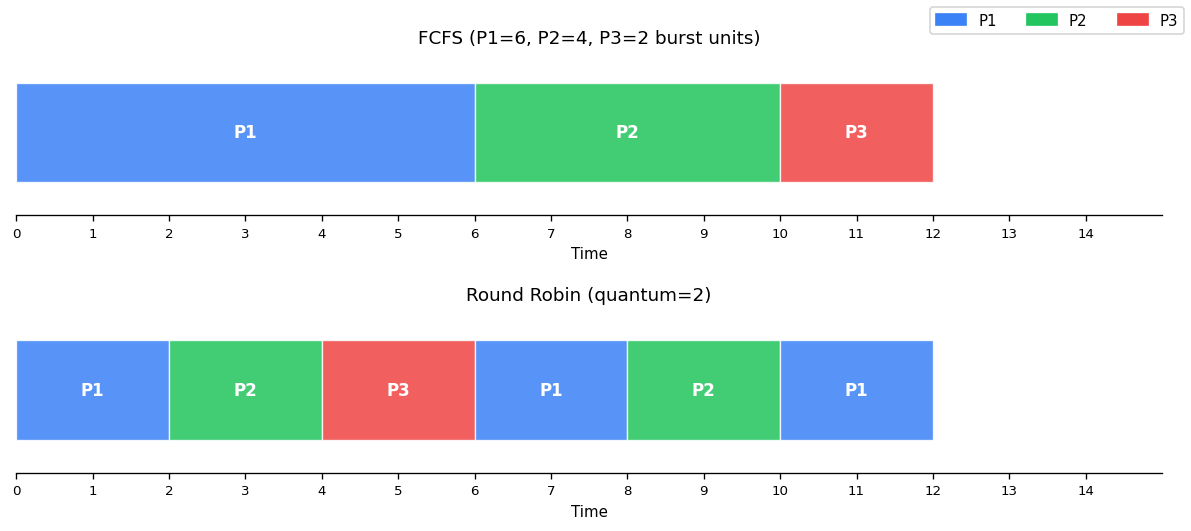
First Come, First Served (FCFS)
Jobs run in order of arrival. Simple and starvation-free, but short jobs get stuck behind long ones (the convoy effect).
Round Robin
Preemptive FCFS — each job runs for one quantum, then yields to the next. This is OS/161’s scheduler. Good response time, but poor turnaround time for short jobs mixed with long ones.
Shortest Job First (SJF)
Run jobs in increasing order of runtime. Minimizes average turnaround time, but starvation is possible — long jobs may never run if short jobs keep arriving.
Shortest Remaining Time First (SRTF)
Preemptive variant of SJF — arriving jobs preempt the current job if they have shorter remaining time. Still susceptible to starvation.
CPU Scheduling
In practice, CPU scheduling differs from the simple model:
- Run times of threads are unknown
- Threads may be blocked (not always runnable)
- Threads may have different priorities
The objective is to balance responsiveness, fairness, and efficiency.
Multi-Level Feedback Queues (MLFQ)
MLFQ is the most commonly used scheduling algorithm in modern operating systems (Windows, macOS, Solaris). The key insight: interactive threads block frequently (waiting for user input, network packets), while compute-bound threads run until preempted.
Algorithm
  Highest Priority
  ┌─────────────────────┐
  │ Q_n (shortest quantum)│ ← blocked threads wake here
  └──────────┬──────────┘
             │ preempt
  ┌──────────▼──────────┐
  │ Q_{n-1}              │
  └──────────┬──────────┘
             │ preempt
  ┌──────────▼──────────┐
  │ Q_{n-2}              │
  └──────────┬──────────┘
             │ ...
  ┌──────────▼──────────┐
  │ Q_1 (longest quantum) │
  └─────────────────────┘
  Lowest Priority
- n round-robin ready queues, where Qi has higher priority than Qj if i > j.
- Threads in Qi use quantum qi, where qi ≤ qj if i > j (higher priority = shorter quantum).
- The scheduler selects a thread from the highest non-empty priority queue.
- On preemption: the thread is demoted to the next lower-priority queue.
- On waking from block: the thread is placed in the highest-priority queue.
- Anti-starvation: periodically, all threads are boosted to the highest-priority queue.
Interactive threads naturally “live” in high-priority queues (because they block frequently and get boosted on wake), while compute-bound threads sink to the bottom.
Linux Completely Fair Scheduler (CFS)
CFS takes a different approach: every thread should get a “fair share” of CPU time proportional to its weight.
- Track the virtual runtime of each runnable thread.
- Always run the thread with the lowest virtual runtime.
- Virtual runtime = actual runtime × (total weight / thread weight).
This means high-weight threads accumulate virtual runtime slowly (they run more), while low-weight threads accumulate it quickly (they run less). Unlike MLFQ, CFS uses the same quantum for all threads.
Multi-Core Scheduling
Two designs for multi-core systems:
Per-core ready queues:
- Better scalability (no contention on a shared queue)
- Better cache affinity (threads stay on the same core, keeping data in that core’s cache)
- Requires load balancing — migrating threads from heavily loaded cores to lightly loaded ones
Shared ready queue:
- Simpler, no load imbalance
- Poor scalability (queue access is a critical section)
- No cache affinity (threads may bounce between cores)
In practice, per-core designs with migration are preferred.
Devices and I/O
Key concepts: device registers, device drivers, program-controlled I/O, DMA, polling, disk drives, disk head scheduling
Devices
Devices are how a computer receives input and produces output. Sys/161 includes: a timer/clock, disk drive, serial console, text screen, and network interface. Real systems add keyboards, mice, printers, GPUs, USB devices, sound cards, and more.
Communication between the CPU and devices is carried out through device registers of three primary types:
| Type | Usage |
|---|---|
| Status | Read to discover the device’s current state |
| Command | Write to issue commands to the device |
| Data | Transfer larger blocks of data to/from the device |
Some registers serve dual roles (e.g., status-and-command).
Device Drivers
A device driver is the part of the kernel that interacts with a specific device. Here is a simplified write to a serial console:
/* Only one writer at a time */
P(output_device_write_semaphore);
/* Trigger the write */
write_character_to_device_data_register();
/* Poll until complete */
do {
    read writeIRQ register;
} while (status != "completed");
/* Acknowledge completion */
write writeIRQ register;
V(output_device_write_semaphore);
This uses polling — the CPU repeatedly checks device status, wasting cycles.
Interrupt-Driven I/O
Instead of polling, use interrupts:
/* Device Driver Write Handler */
P(output_device_write_semaphore);
write_character_to_device_data_register();
/* Thread blocks here, waiting for completion */

/* Interrupt Handler (called when device finishes) */
write writeIRQ register;   /* acknowledge */
V(output_device_write_semaphore);
The driver thread blocks (sleeping on the semaphore) until the device fires an interrupt to signal completion.
Accessing Devices
Port-Mapped I/O — Devices are assigned port numbers in a separate, smaller address space. Special instructions like x86 in and out transfer data between ports and CPU registers.
Memory-Mapped I/O — Each device register has a physical memory address. Drivers use normal load/store instructions. MIPS/OS161 uses this approach — devices are mapped into the physical address range 0x1FE0_0000 – 0x1FFF_FFFF, divided into 32 64KB slots.
Large Data Transfers
Program-controlled I/O — The device driver moves data between memory and the device buffer. The CPU is busy during transfer.
Direct Memory Access (DMA) — The device itself moves data to/from memory. The CPU is free to do other work. Sys/161 disks use program-controlled I/O.
Hard Disk Drives
A hard disk has spinning, ferromagnetic-coated platters read/written by a moving read/write head. Logically, the disk is an array of numbered sectors (blocks), each the same size (e.g., 512 bytes).
Cost Model for Disk I/O
Request Service Time = Seek Time + Rotational Latency + Transfer Time
- Seek time — Moving the read/write heads to the correct track. 0 to max seek time (typically 4–20 ms).
- Rotational latency — Waiting for the desired sector to spin under the head. 0 to one full rotation (e.g., 6 ms at 10,000 RPM).
- Transfer time — Time for the desired sectors to pass under the head.
Key insight: larger, sequential transfers are more efficient. Seek time dominates, so grouping requests to minimize seeks is crucial.
Disk Head Scheduling
Given a queue of outstanding disk requests, the order in which they are serviced can dramatically affect performance:
FCFS — Service in arrival order. Fair but no seek optimization.
Shortest Seek Time First (SSTF) — Always choose the closest request (greedy). Reduces seek times but risks starvation for distant requests.
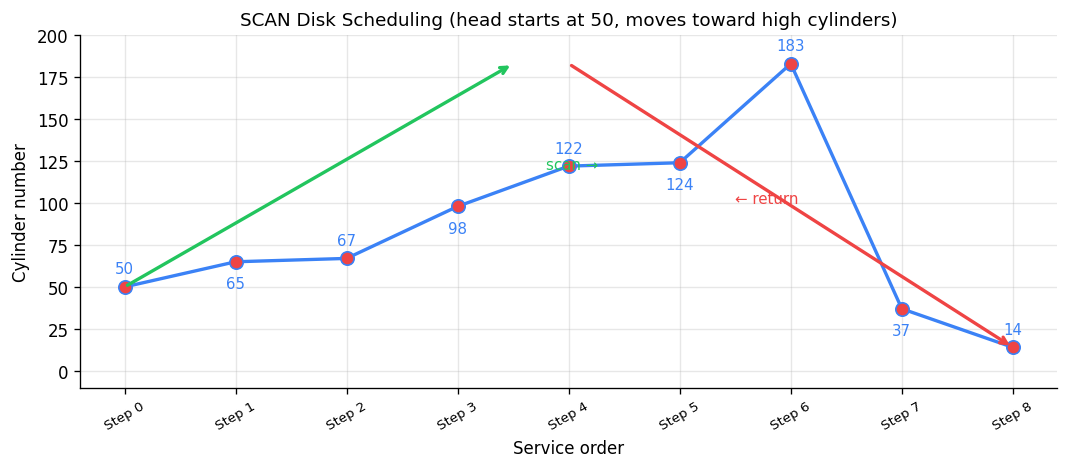
SCAN (Elevator Algorithm) — The disk head moves in one direction until there are no more requests ahead, then reverses. Reduces seek times while avoiding starvation.
SCAN disk scheduling — head starts at cylinder 50, sweeps to high cylinders then returns.
Solid State Drives (SSDs)
SSDs use integrated circuits instead of magnetic surfaces — no mechanical parts. Reads/writes happen at the page level (2–8 KB), but erasure (resetting bits from 0 to 1) must happen at the block level (32 KB – 4 MB).
The SSD controller handles the complexity:
- Mark the page to be overwritten as invalid
- Write to an unused page
- Update the internal translation table
- Perform garbage collection to reclaim invalid pages
Each block has a limited number of write cycles before becoming read-only. The controller performs wear leveling to distribute writes evenly. Defragmenting an SSD is harmful — it wastes write cycles for no performance gain (there are no moving parts to optimize).
Persistent RAM
Technologies like Intel Optane use resistive RAM (ReRAM) that retains data without power. These modules (16–32 GB) can cache disk blocks that would not fit in traditional CPU caches, offering significant performance improvements for systems using mechanical disks.
File Systems
Key concepts: file, directory, link, open/close, descriptor, read, write, seek, file naming, block, i-node, crash consistency, journaling
Files and File Systems
Files are persistent, named data objects. Each file is a sequence of numbered bytes that may change size and has associated meta-data (type, timestamp, access controls).
File systems have three layers:
- Logical file system — The high-level API that users interact with
- Virtual file system (VFS) — An abstraction layer that presents multiple different underlying file systems as one unified interface
- Physical file system — How files are actually stored on physical media
File Interface
open returns a file descriptor (handle) identifying the file for subsequent operations.
close invalidates a file descriptor.
read/write copy data between a file and a virtual address space. They operate starting from the current file position (initially byte 0) and update it.
lseek changes the file position for non-sequential I/O.
/* Sequential reading: first 51,200 bytes, 512 at a time */
char buf[512];
int f = open("myfile", O_RDONLY);
for (int i = 0; i < 100; i++) {
    read(f, (void *)buf, 512);
}
close(f);

/* Reverse reading using seek */
int f = open("myfile", O_RDONLY);
for (int i = 1; i <= 100; i++) {
    lseek(f, (100 - i) * 512, SEEK_SET);
    read(f, (void *)buf, 512);
}
close(f);
Directories and File Names
A directory maps file names (strings) to i-numbers — unique identifiers within a file system. Given an i-number, the file system can locate the file’s data and meta-data.
Directories can be nested, forming a tree with a single root. Files are identified by pathnames like /home/user/courses/cs350/notes/filesys.pdf. Only the kernel is permitted to edit directories (to prevent corruption of the namespace).
Hard Links
A hard link is an association between a name and an i-number. Each directory entry is a hard link. A file has a unique i-number but may have multiple pathnames through additional hard links:
link("/docs/a.txt", "/foo/myA"); /* New pathname for same file */
When the last hard link to a file is removed (via unlink), the file is deleted. Hard links to directories are not permitted (to avoid cycles).
Mounting
Unix systems combine multiple file systems into a single namespace using mount. Windows uses drive letters (C:, D:).
Physical File System: VSFS
The Very Simple File System (VSFS) illustrates core concepts using a tiny 256 KB disk with 512-byte sectors grouped into 4 KB blocks (64 total blocks):
┌───────┬──┬──┬─────────────┬──────────────────────────────┐
│ Super │ib│db│  i-nodes    │         data blocks           │
│ block │  │  │  (5 blocks) │        (56 blocks)            │
└───────┴──┴──┴─────────────┴──────────────────────────────┘
  1 blk  1  1    5 blocks              56 blocks
- Superblock — Meta-information about the entire file system (number of i-nodes, blocks, where the i-node table begins).
- i-node bitmap — Tracks which i-nodes are in use.
- Data bitmap — Tracks which data blocks are in use.
- i-node table — Array of i-nodes (5 blocks × 4096 bytes / 256 bytes per i-node = 80 i-nodes).
- Data blocks — User file data.
i-nodes
An i-node is a fixed-size index structure holding file meta-data and pointers to data blocks:
┌──────────────────────┐
│  File meta-data      │     Data blocks
│  (type, permissions, │
│   length, times,     │     ┌────────┐
│   link count)        │     │ block  │
├──────────────────────┤     └────────┘
│  direct ptr 0  ──────┼──►  ┌────────┐
│  direct ptr 1  ──────┼──►  │ block  │
│  ...                 │     └────────┘
│  direct ptr 11 ──────┼──►
├──────────────────────┤
│  single indirect ────┼──► [1024 ptrs] ──► data blocks
├──────────────────────┤
│  double indirect ────┼──► [1024 ptrs] ──► [1024 ptrs] ──► data
├──────────────────────┤
│  triple indirect ────┼──► ...
└──────────────────────┘
With 4-byte block addresses and 4 KB blocks:
- 12 direct pointers: max file size = 12 × 4 KB = 48 KB
- + 1 single indirect: 12 + 1024 = 1036 blocks → ~4 MB
- + 1 double indirect: + 1024² blocks → ~4 GB
- + 1 triple indirect: + 1024³ blocks → ~4 TB
Reading a File: /foo/bar
Opening and reading a file requires traversing the directory tree:
- Read root i-node → find root’s data block
- Read root’s data → find
foo’s i-number - Read
foo’s i-node → findfoo’s data block - Read
foo’s data → findbar’s i-number - Read
bar’s i-node → check permissions, create file descriptor - For each read: read
bar’s i-node (if not cached), follow pointer to data block, read data block, update access time
Opening /foo/bar requires at least 5 disk reads. Each subsequent block read requires 2 more (i-node + data block) plus a write (access time update).
Alternative: Chaining
Instead of per-file indexes (i-nodes), some file systems use chaining:
- Direct chaining — Each block includes a pointer to the next block. Good for sequential access, terrible for random access.
- External chaining (FAT) — A File Allocation Table stores all the chains externally. Microsoft’s FAT file system uses this approach.
File System Design Considerations
For a general-purpose file system, design for the common case:
- Most files are small (~2 KB)
- Average file size is growing
- ~100,000 files on average
- Directories typically contain few files
- Average file system usage is ~50%
Crash Consistency
A single logical file system operation (like deleting a file) may require several disk I/O operations:
- Remove entry from directory
- Remove i-node from i-node table
- Mark data blocks free in bitmap
If a crash occurs partway through, the on-disk state is inconsistent. Two approaches:
Consistency checkers (e.g., Unix fsck, Linux ext2) — Run after a crash to find and repair inconsistencies. Slow but thorough.
Journaling (e.g., NTFS, Linux ext3, ext4) — Write-ahead logging: record all meta-data changes in a journal first, then apply them to the actual data structures. After a crash, replay the journal to complete any interrupted operations. This is much faster than a full consistency check.
Virtual Machines
Key concepts: virtualization, hypervisors, extended page tables
What is a Virtual Machine?
A virtual machine is a simulated or emulated computer system. Sys/161, used throughout this course, is an emulation of a MIPS R3000. Virtual machines allow one physical machine to act as many — operating systems and programs run in isolation, ideally without modification.
Virtual machines date back to the 1960s but had poor performance. They surged in 2005 when CPUs added hardware virtualization support.
The Challenges
Running an OS inside a VM raises fundamental questions:
- Privilege — The guest OS wants to execute privileged instructions (disable interrupts, modify page tables). Can the VM allow this? Should it?
- Interrupts — When a keyboard interrupt fires on the physical CPU, which VM should handle it?
- Virtual Memory — If both a guest OS and the host OS map to the same physical page, there’s a collision.
Hypervisors
A hypervisor (virtual machine manager) creates and manages VMs. There are two types:
  Type 1 (Bare Metal)          Type 2 (Hosted)
  ┌─────┬─────┬─────┐         ┌─────┬─────┬─────┐
  │ VM1 │ VM2 │ VM3 │         │ VM1 │ VM2 │ VM3 │
  ├─────┴─────┴─────┤         ├─────┴─────┴─────┤
  │   Hypervisor     │         │   Hypervisor     │
  ├──────────────────┤         ├──────────────────┤
  │      CPU         │         │  Host OS         │
  └──────────────────┘         ├──────────────────┤
                               │      CPU         │
                               └──────────────────┘
Type 1 hypervisors run in privileged mode directly on hardware. VMs run in less-privileged modes. Unprivileged instructions execute normally; privileged instructions trap to the hypervisor, which emulates their behavior.
Type 2 hypervisors run as a user process on the host OS. They translate and execute unprivileged instructions, emulate privileged ones, and make system calls to the host OS as needed.
Privilege Rings
How does the hypervisor distinguish between the guest OS and a guest user program executing a privileged instruction? Modern CPUs provide multiple privilege rings:
- Ring 0 (highest): Hypervisor
- Ring 1: Guest OS
- Ring 2/3: Guest user programs
When a privileged instruction traps, the hypervisor checks which ring the caller was in to determine the appropriate response.
Virtual Memory in VMs
Each guest OS believes it manages physical memory, but multiple guests may map to the same physical page. The solution:
Shadow page tables — The hypervisor maintains a mapping from guest physical addresses to actual host physical addresses. Every translation goes through the hypervisor, which is correct but slow.
Extended Page Tables (EPT) — Modern CPUs (Intel Nehalem+) support this directly in the MMU. The hardware can translate guest virtual → guest physical → host physical in a single operation. The hypervisor updates the MMU’s page table base register on a world swap (when the running VM changes).
If the sum of memory allocated to all guests exceeds physical memory, the hypervisor can use on-demand paging (swapping) at the host level.
I/O and Devices
For storage, the hypervisor creates a file on the host disk and presents it to the VM as a complete file system (which can appear as any type of disk).
For other devices:
- Device pass-through assigns devices to specific VMs
- Device isolation ensures devices assigned to one VM don’t affect others
- Interrupt redirection routes device interrupts to the correct VM (requires hardware support)
Why Virtual Machines?
- Sandboxing — Run suspect or sensitive applications safely
- Development — Test on different architectures or OSes without dedicated hardware
- Resource utilization — Multiple users share a server in isolation (AWS, Azure, Google Cloud)
- Checkpoints/Snapshots — Pause a VM and resume later from the exact saved position
Debugging
This section is based on the debugging lecture notes by Professor Ali Mashtizadeh, University of Waterloo (CS 350, W25). Source: debugging.pdf
As Benjamin Franklin said, “An ounce of prevention is worth a pound of cure.” Operating system bugs — especially concurrency bugs — are notoriously difficult to reproduce and diagnose. This section covers both preventative approaches (catching bugs before they happen) and debugging approaches (finding bugs after they happen).
Preventative Approaches
Compiler Tools
The compiler is your first line of defense. Enable all warnings and treat them as errors:
CFLAGS=-Wall -Werror
Never ignore warnings about:
- Uninitialized variables — A common source of nondeterministic behavior
- Undefined behavior — The compiler may optimize away code you expect to run
Note that -Wall sometimes enables benign warnings (like unused arguments), but it is far better to address these than to miss a genuine bug.
Using the Language/Compiler to Detect Bugs
Delay variable initialization. Do not initialize variables until you need to. This allows the compiler to detect cases where you may have forgotten to set a value:
/* BAD: hides missing assignment */     /* GOOD: compiler warns */
void foo() {                            void foo() {
    int status = 0;                         int status;
    ...                                     ...
    if (...) {                              if (...) {
        status = 1;                             status = 1;
        return status;                          return status;
    }                                       }
    return status;  /* silent 0 */          /*
}                                            * Warning: use of unassigned
                                             * local variable.
                                             */
                                            return status;
                                        }
Always check return values. Ignoring return values makes debugging very difficult — this happens frequently in OS/161 assignments. Some APIs enforce this:
int pthread_mutex_trylock(...)
    __attribute__((warn_unused_result));
There is no correct way to use trylock without checking the return value.
Disable implicit casting. Force yourself to explicitly cast types — this makes you think about type safety and prevents subtle truncation or sign-extension bugs.
Defensive Programming: Asserts
Use assert to check pre-conditions and post-conditions. If you are not checking whether an input is valid, you are assuming a condition — make that assumption explicit:
void foo(...) {
    assert(precondition ...);

    ...  /* function body */

    assert(postcondition ...);
    return status;
}
You can also insert compile-time checks with static_assert to catch errors before the program even runs.
Defensive Programming: Enums and APIs
Prefer enum over bool for flags. Boolean flags are easy to mix up — worse, they can get accidentally inverted across software layers. An enum with explicit names makes the intent clear.
Use enum for switch-case statements. Avoid a default case if possible — this lets the compiler warn you about missing cases when you add a new enum value.
Avoid confusing APIs. For example, strncpy vs. strlcpy and strncat vs. strlcat — strncpy does not null-terminate the string when the buffer is too small, a classic source of buffer overrun bugs.
Static Analysis
Static analysis tools examine source code without executing it, finding bugs like memory leaks, null pointer dereferences, and unreachable code. Key tools include:
- Clang Static Analyzer — Built into LLVM/Clang, visualizes control flow and resource lifecycle
- KLEE — Symbolic execution engine that explores all possible program paths
- Coverity — Industrial-strength static analysis used in production codebases
Runtime Checkers
Runtime checkers instrument your code to detect bugs during execution:
#include <pthread.h>
int Global;
void *Thread1(void *x) {
    Global = 42;
    return x;
}
int main() {
    pthread_t t;
    pthread_create(&t, NULL, Thread1, NULL);
    Global = 43;           /* Data race! */
    pthread_join(t, NULL);
    return Global;
}
Running with ThreadSanitizer (-fsanitize=thread) produces:
% ./a.out
WARNING: ThreadSanitizer: data race (pid=19219)
  Write of size 4 at 0x7fcf47b21bc0 by thread T1:
    #0 Thread1 tiny_race.c:4 (exe+0x00000000a360)

  Previous write of size 4 at 0x7fcf47b21bc0 by main thread:
    #0 main tiny_race.c:10 (exe+0x00000000a3b4)
Key runtime checkers:
- ThreadSanitizer — Detects data races between threads
- AddressSanitizer — Detects buffer overflows, use-after-free, memory leaks
- Eraser — Classic lockset-based race detector (research tool)
Debugging Approaches
Debuggers
Debuggers (like GDB) are invaluable for inspecting crashes — you can examine the call stack, register state, and memory contents at the point of failure. However, Professor Mashtizadeh notes that throughout his career at VMware and during his Ph.D., he used debuggers mainly to inspect crashes (rarely), while relying on log debugging for everything else. This requires disciplined use of logging throughout the code.
Effective Logging
Good logging practice:
- Log major operations — Every significant state change should leave a trace
- Per-subsystem control — Turn logging on/off for specific modules
- Compile out unnecessary logs — Use
#ifdef DEBUGor log-level checks so production builds are not slowed - Timestamp every message — Essential for understanding the order of concurrent events
- Include unique identifiers — Every log message should print a task/object ID so you can
grepto filter relevant events - Dump state on crash — Register signal handlers that print diagnostic information
Log Debugging Pitfalls
Logging in an OS kernel is surprisingly treacherous. Three key pitfalls:
Pitfall 1: NMIs (Non-Maskable Interrupts). Logging code is complex — it touches *printf, the console, and serial devices. You cannot use mutex locks inside a spinlock region (they may block, violating the non-blocking requirement of spinlock-protected code). The kernel’s kprintf avoids locking by having the console and serial driver implement per-character spinlocks with interrupts disabled. But certain interrupts (Non-Maskable Interrupts, Machine Check Exceptions) cannot be disabled. If one of these fires while the logging spinlock is held, the interrupt handler tries to log, tries to acquire the same spinlock, and the thread deadlocks with itself.
Solutions (all imperfect):
- Drop log messages if device locks are held
- Attempt to write to the device without locks
- Use
trylockto acquire locks non-blocking - Buffer messages in a lock-free buffer
Both approaches result in unreliable logging — in these situations, you probably want to attach a debugger instead.
Pitfall 2: Heisenbugs. Adding logging changes timing, which can make race conditions appear or disappear. A bug that vanishes when you add a printf to investigate it is called a Heisenbug (after Heisenberg’s uncertainty principle). This is one of the most frustrating aspects of debugging concurrent code — the act of observation changes the behavior.
Pitfall 3: Logging and Locks. If your logging code acquires locks, and the code you are debugging also acquires locks, you may introduce new deadlocks or change lock ordering in ways that mask or create bugs.
Practice Problems and Worked Examples
This section collects practice problems from multiple sources to help solidify each topic. All problems are credited to their original sources.
Threads and Context Switches
Source: UW CS354/CS350 Study Questions and UNSW COMP3231 Sample Exam
Q1: Describe the steps that occur when a timer interrupt results in a context switch.
Answer: (1) Thread 1 is running. (2) Timer fires. (3) CPU traps into kernel space (privileged mode). (4) Switch to kernel stack for Thread 1. (5) Thread 1’s user registers are saved in a trap frame. (6) The scheduler selects the next thread. (7) Context switch: callee-save registers saved on Thread 1’s kernel stack, loaded from Thread 2’s kernel stack. (8) Thread 2’s user registers are restored from its trap frame. (9) Return to unprivileged mode; Thread 2 resumes execution.
Q2: What does the low-level switchframe_switch function do internally?
Answer: (1) Saves callee-save registers onto the current thread’s kernel stack. (2) Stores the stack pointer in the current thread’s control block. (3) Loads the stack pointer from the destination thread’s control block. (4) Restores callee-save registers from the destination thread’s stack. (5) Returns — but the return address (ra) now belongs to the destination thread, so execution continues in that thread’s context.
Q3 (OSTEP x86 simulator): Two threads each increment a shared variable. What can go wrong?
Source: OSTEP Homework — Threads Intro
Thread 0:          Thread 1:
mov 0x0, %ax       mov 0x0, %ax
add $1, %ax        add $1, %ax
mov %ax, 0x0       mov %ax, 0x0
Answer: With context switches between instructions, both threads may read the same value (say 0), increment it to 1, and write back 1. The final value is 1 instead of the expected 2. This is a classic lost update race condition.
Synchronization
Source: UW CS350 Midterm Style Problems and UNSW COMP3231
Q4: What are the three requirements for solving the critical section problem?
Answer:
- Mutual Exclusion — No two threads may be simultaneously in the critical section.
- Progress — No thread outside the critical section may block another thread from entering.
- Bounded Waiting — No thread must wait forever to enter the critical section.
Q5: Re-implement the following semaphore-based code using only locks and condition variables.
sem_t sa = 1, sb = 0;

void func1() {         void func2() {
    P(sa);                 P(sb);
    /* critical A */       /* critical B */
    V(sb);                 V(sa);
}                       }
Source: UW CS350 F15 Midterm Style
Answer:
lock_t lock;
cv_t cv_a, cv_b;
int count_a = 1, count_b = 0;

void func1() {
    lock_acquire(&lock);
    while (count_a == 0) cv_wait(&cv_a, &lock);
    count_a--;
    lock_release(&lock);

    /* critical section A */

    lock_acquire(&lock);
    count_b++;
    cv_signal(&cv_b, &lock);
    lock_release(&lock);
}

void func2() {
    lock_acquire(&lock);
    while (count_b == 0) cv_wait(&cv_b, &lock);
    count_b--;
    lock_release(&lock);

    /* critical section B */

    lock_acquire(&lock);
    count_a++;
    cv_signal(&cv_a, &lock);
    lock_release(&lock);
}
Q6: Enforce: at most 1 thread in funcB, at most 2 threads total in funcA or funcB combined.
Source: UW CS350 F16 Midterm Style
Answer:
sem_t total = 2;     /* at most 2 in funcA + funcB combined */
sem_t mutex_b = 1;   /* at most 1 in funcB */

void funcA() {
    P(total);
    /* do funcA work */
    V(total);
}

void funcB() {
    P(total);
    P(mutex_b);
    /* do funcB work */
    V(mutex_b);
    V(total);
}
Q7: Why must we use while instead of if before cv_wait()?
Source: UNSW COMP3231 Sample Exam
Answer: Because of Mesa semantics (used by OS/161 and most real systems). When a thread is signaled and wakes up, other threads may run before it and change the condition. For example, a consumer woken by a producer’s signal may find the buffer empty again because another consumer already consumed the item. The while loop re-checks the condition after waking. With if, the thread would proceed incorrectly.
Q8: Name and explain the four necessary conditions for deadlock.
Source: UW CS354 Study Questions
Answer:
- Mutual Exclusion — Only one thread can hold a resource at a time.
- Hold and Wait — A thread can hold resources while waiting for more.
- No Preemption — Resources cannot be forcibly taken from the holder.
- Circular Wait — A circular chain of threads exists, each waiting for the next thread’s resource.
All four conditions must hold simultaneously for deadlock to occur. Breaking any one prevents deadlock.
Q9: Is this system deadlocked?
Source: UNSW COMP3231 Sample Exam
Allocation:       Request:        Available:
    R1  R2          R1  R2          R1  R2
P1   1   1      P1   1   0          1   4
P2   1   0      P2   0   1
P3   0   1      P3   1   1
P4   1   1      P4   0   2
Answer: Apply the banker’s algorithm:
- P1 needs [1,0], available [1,4] ≥ [1,0]. P1 runs, releases [1,1]. Available = [2,5].
- P3 needs [1,1], available [2,5] ≥ [1,1]. P3 runs, releases [0,1]. Available = [2,6].
- P2 needs [0,1], available [2,6] ≥ [0,1]. P2 runs. Available = [3,6].
- P4 needs [0,2], available [3,6] ≥ [0,2]. P4 runs.
All processes complete → NOT deadlocked. A safe sequence exists: P1, P3, P2, P4.
Virtual Memory
Source: GeeksforGeeks GATE Problems and OSTEP Homework
Q10: A system has 57-bit virtual addresses, 4 KB pages, and 8-byte PTEs. How many levels in a multi-level page table?
Source: GATE 2023
Answer:
- Page offset = log2(4 KB) = 12 bits
- Remaining bits for page number = 57 − 12 = 45 bits
- Entries per page = 4 KB / 8 B = 512 = 29 → 9 bits per level
- Levels needed = 45 / 9 = 5 levels
Q11: 32-bit virtual/physical addresses, two-level page table with breakdown: 10 | 10 | 12 bits. PTE = 4 bytes. A process uses 2 code pages at 0x00000000, 2 data pages at 0x00400000, and 1 stack page at 0xFFFFF000. How much memory for page tables?
Source: GATE 2003
Answer:
- L1 page table: always 1 page = 4 KB
- L2 tables needed: 3 (one for each distinct L1 index — 0x000, 0x001, 0x3FF)
- Total = 4 pages × 4 KB = 16 KB
Q12: 16-bit virtual address space, 256-byte pages, 32 KB physical memory. How many bits for VPN? How many physical frames? How many page table entries?
Answer:
- Offset = log2(256) = 8 bits
- VPN = 16 − 8 = 8 bits
- Physical frames = 32 KB / 256 B = 128 frames
- Page table entries = 28 = 256 entries
Q13: Memory access = 100 ns. TLB lookup = 20 ns. TLB hit rate = 80%. What is the effective memory access time?
Answer:
- TLB hit: 20 ns (TLB) + 100 ns (memory) = 120 ns
- TLB miss: 20 ns (TLB) + 100 ns (page table) + 100 ns (memory) = 220 ns
- Effective = 0.80 × 120 + 0.20 × 220 = 96 + 44 = 140 ns
Q14: What is thrashing? How do you detect and recover from it?
Source: UNSW COMP3231 Sample Exam
Answer: Thrashing occurs when the combined memory demands of all running processes exceed physical memory, causing constant page swapping. The system spends most of its time handling page faults rather than doing useful work. Detection: Monitor swapping activity vs. CPU utilization — high swap rate with low CPU utilization indicates thrashing. Recovery: Suspend some processes to reduce memory pressure, or increase physical memory.
Q15: OSTEP Paging Address Translation — Translate VA 0x3229 with 4 KB pages.
Source: OSTEP Homework — Paging
Answer:
- VPN = 0x3229 » 12 = 0x3
- Offset = 0x3229 & 0xFFF = 0x229
- Look up VPN 3 in page table → PFN = 0x6 (valid)
- Physical address = 0x6000 + 0x229 = 0x6229
Scheduling
Source: OSTEP Homework and UNSW COMP3231
Q16: Jobs arrive at time 0: A (length 8), B (length 4), C (length 2). Compute average turnaround and response time for FCFS, SJF, and Round Robin (q=2).
FCFS (order A, B, C):
| Job | Start | Finish | Turnaround | Response |
|---|---|---|---|---|
| A | 0 | 8 | 8 | 0 |
| B | 8 | 12 | 12 | 8 |
| C | 12 | 14 | 14 | 12 |
Average turnaround = 11.33, average response = 6.67
SJF (order C, B, A):
| Job | Start | Finish | Turnaround | Response |
|---|---|---|---|---|
| C | 0 | 2 | 2 | 0 |
| B | 2 | 6 | 6 | 2 |
| A | 6 | 14 | 14 | 6 |
Average turnaround = 7.33, average response = 2.67
Round Robin (q=2):
Timeline: A(0-2) B(2-4) C(4-6) A(6-8) B(8-10) A(10-12) A(12-14)
| Job | First Run | Finish | Turnaround | Response |
|---|---|---|---|---|
| A | 0 | 14 | 14 | 0 |
| B | 2 | 10 | 10 | 2 |
| C | 4 | 6 | 6 | 4 |
Average turnaround = 10.0, average response = 2.0
Key insight: SJF minimizes average turnaround time, RR gives good average response time, and FCFS is worst on both metrics when long jobs arrive first (the convoy effect).
Q17: What happens when the time quantum in Round Robin is too large? Too small?
Answer: Too large → degenerates into FCFS, poor response time. Too small → excessive context switch overhead, most CPU time spent switching rather than executing.
Q18: How does MLFQ prevent starvation and gaming?
Source: OSTEP Ch. 8
Answer: (1) Priority boost: Periodically move all jobs to the highest-priority queue, preventing long-running jobs from starving. (2) Accounting: Track total CPU time at each priority level. Even if a job releases the CPU before its quantum expires (trying to game the scheduler), once its total allotment at that level is used up, it gets demoted.
Disk Scheduling
Source: GeeksforGeeks — Disk Scheduling Algorithms
Q19: Request queue: 82, 170, 43, 140, 24, 16, 190. Initial head position: 50. Calculate total head movement for each algorithm.
FCFS: Order: 82 → 170 → 43 → 140 → 24 → 16 → 190 Total = |50−82| + |82−170| + |170−43| + |43−140| + |140−24| + |24−16| + |16−190| = 32 + 88 + 127 + 97 + 116 + 8 + 174 = 642 tracks
SSTF (Shortest Seek Time First): Order: 43 → 24 → 16 → 82 → 140 → 170 → 190 Total = 7 + 19 + 8 + 66 + 58 + 30 + 20 = 208 tracks
SCAN (Elevator, moving toward higher values): Order: 82 → 140 → 170 → 190 → [199] → 43 → 24 → 16 Total = (199 − 50) + (199 − 16) = 332 tracks
LOOK (like SCAN but reverses at last request, not disk edge): Order: 82 → 140 → 170 → 190 → 43 → 24 → 16 Total = (190 − 50) + (190 − 16) = 314 tracks
File Systems and i-nodes
Source: UNSW COMP3231 Sample Exam and UW CS354 Study Questions
Q20: Block size = 4 KB, block pointer = 4 bytes. i-node has 12 direct pointers, 1 single indirect, 1 double indirect, 1 triple indirect. What is the maximum file size?
Answer:
- Pointers per indirect block = 4 KB / 4 B = 1024
- Direct: 12 blocks
- Single indirect: 1024 blocks
- Double indirect: 10242 = 1,048,576 blocks
- Triple indirect: 10243 = 1,073,741,824 blocks
- Total = 1,074,791,436 blocks × 4 KB ≈ 4 TB
Q21: How many disk reads to access byte 5,000,000 of a file? (i-node already cached, block size = 4 KB, 12 direct pointers, pointer size = 4 bytes)
Answer:
- Block number = ⌊5,000,000 / 4096⌋ = block 1220
- Direct blocks cover 0–11 (12 blocks)
- Single indirect covers 12–1035 (1024 blocks)
- Block 1220 > 1035, so it falls in the double indirect
- Reads: (1) double indirect block → (2) appropriate single indirect block → (3) data block
- Total: 3 disk reads
Q22: How many disk I/Os to open /home/user/file.txt? (root i-node cached)
Answer:
- Read root data block (find “home”) — 1 read
- Read home i-node — 1 read
- Read home data block (find “user”) — 1 read
- Read user i-node — 1 read
- Read user data block (find “file.txt”) — 1 read
- Read file.txt i-node — 1 read
Total: 6 disk reads (root i-node was cached)
Q23: What is the difference between data journaling and metadata journaling?
Source: OSTEP Ch. 42 — Journaling
Answer: Data journaling writes both data and metadata to the journal before committing to final locations — safer but slower (data written twice). Metadata journaling writes only metadata (i-node, bitmap changes) to the journal; data goes directly to its final location — faster but data blocks may be inconsistent after a crash if the metadata was journaled but the data write was incomplete.
Q24: What happens when you delete the original file that a hard link points to? What about a symbolic link?
Answer: Hard link: The file data persists because the reference count is still > 0 — the hard link is just another name for the same i-node. Symbolic link: The symlink becomes a dangling pointer — accessing it gives “file not found” because the target path no longer exists.
Q25: Maximum file size with 16 direct blocks, single/double/triple indirection, block size = 512 bytes, pointer size = 4 bytes.
Source: UNSW COMP3231 Sample Exam
Answer:
- Pointers per block = 512 / 4 = 128
- Direct: 16 blocks
- Single indirect: 128 blocks
- Double indirect: 1282 = 16,384 blocks
- Triple indirect: 1283 = 2,097,152 blocks
- Total = 2,113,680 blocks × 512 B ≈ 1,058 GB
OSTEP Simulator Commands for Self-Study
Source: OSTEP Homework Repository — Community solutions at github.com/xxyzz/ostep-hw
These Python simulators generate unlimited practice problems (use -c flag for solutions):
## CPU Scheduling ##
python scheduler.py -p FIFO -j 3 -s 0 -c
python scheduler.py -p SJF  -j 3 -s 0 -c
python scheduler.py -p RR -q 2 -j 3 -s 0 -c

## Multi-Level Feedback Queue ##
python mlfq.py -j 3 -q 10 -c
python mlfq.py --jlist 0,180,0:100,20,0 -q 10 -c

## Paging (address translation) ##
python paging-linear-translate.py -c
python paging-multilevel-translate.py -c

## Page Replacement ##
python paging-policy.py -p FIFO -C 3 -a 1,2,3,4,1,2,5,1,2,3,4,5 -c
python paging-policy.py -p LRU  -C 3 -a 1,2,3,4,1,2,5,1,2,3,4,5 -c
python paging-policy.py -p OPT  -C 3 -a 1,2,3,4,1,2,5,1,2,3,4,5 -c

## Disk Scheduling ##
python disk.py -a 10 -c
python disk.py -a 10,18 -c

## File System Operations ##
python vsfs.py -c
Additional Resources
| Resource | URL | Description |
|---|---|---|
| UW CS350 Past Midterms (with solutions) | old-exams | ~25 terms of midterms, most with solutions |
| UW CS354/CS350 Study Questions + Solutions | review-questions | Comprehensive study set covering all topics |
| OSTEP Textbook (free) | ostep.org | Operating Systems: Three Easy Pieces by Arpaci-Dusseau |
| OSTEP Homework Simulators | GitHub | Infinite practice problems with -c solutions |
| OSTEP Community Solutions | GitHub | Worked solutions to OSTEP homework |
| Dillion Verma’s CS350 Exam Review | GitHub | 8-unit study guide |
| Anthony Zhang’s CS350 Notes | anthony-zhang.me | Full course notes with worked examples |
| UNSW OS Sample Exam (101 Qs + answers) | UNSW | Comprehensive OS exam bank |
| Allen Downey’s “Little Book of Semaphores” | greenteapress.com | Dozens of semaphore synchronization problems (free PDF) |
| GeeksforGeeks OS Problems | geeksforgeeks.org | Practice problems for GATE and interview prep |
These notes synthesize the complete CS 350 (Operating Systems) course as taught by Professor Lesley Istead at the University of Waterloo, Spring 2021. The debugging section is based on lecture notes by Professor Ali Mashtizadeh (CS 350, W25). Primary sources include the course lecture slides, YouTube lecture recordings (S21 Episodes 1–24, with supplementary material from W21 and F20 offerings), the OSTEP textbook, UW past exams, and external problem sets as credited throughout.